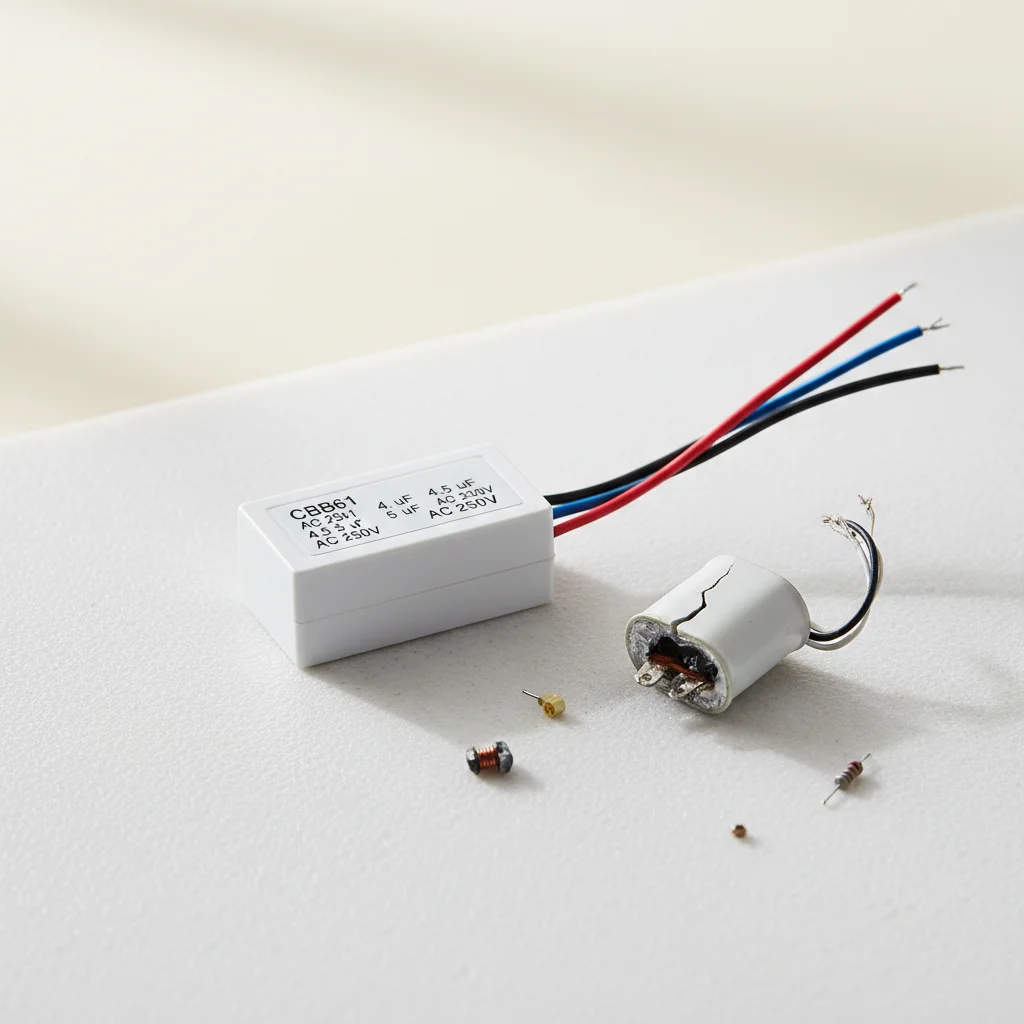
Ceiling fan capacitors typically last between 5 to 10 years, but their lifespan can be shortened by factors like power surges, excessive heat, and manufacturing defects. These small but crucial components store and release electrical energy, providing the necessary jolt to start the motor and maintain its speed. When a capacitor fails, your fan might hum, spin slowly, or not start at all, making replacement a common and often DIY-friendly repair.
Understanding the Role of a Ceiling Fan Capacitor
A capacitor in a ceiling fan serves two primary functions: starting the motor and regulating its speed. When you turn on your fan, the capacitor provides an initial burst of power to overcome the motor’s inertia, getting the blades moving. For multi-speed fans, different capacitors or capacitor combinations are used to achieve varying speeds. Without a properly functioning capacitor, the motor might not receive enough power to start, or it might struggle to maintain a consistent speed, leading to inefficient operation and potential overheating. For explore our ceiling fans reviews on this site.
Common Signs of a Failing Capacitor
Several indicators point to a failing ceiling fan capacitor. The most common sign is a fan that hums but doesn’t spin, or spins very slowly even on its highest setting. You might also notice the fan struggling to start, requiring a manual push to get the blades moving. Another tell-tale sign is a fan that only works on one speed, or a fan that reverses direction erratically. In some cases, a visibly bulging or leaking capacitor can be found within the fan’s housing, indicating a complete failure. Addressing these issues promptly can prevent further damage to the fan motor.
How to Safely Replace a Ceiling Fan Capacitor
|
Our Picks for the Best Ceiling Fan in 2026
As an Amazon Associate I earn from qualifying purchases.
|
||
| Num | Product | Action |
|---|---|---|
| 1 | 41 inch Ceiling Fans with Lights, Black Flush Mount Ceiling Fan with Remote, 3CCT, LED Dimmable, Reversible, 6 Fan Speeds, Quite Low Profile Ceiling Fan with Lights Modern Bedroom Kitchen Indoor |

|
| 2 | OJX Ceiling Fans with Lights, 52 inch Ceiling fan with Light and Remote/APP Control, 3CCT, Quiet DC Reversible, Dimmable, Modern Ceiling Fan for Bedroom, Living Room, Kitchen, Indoor/Outdoor Use |
|
| 3 | ZMISHIBO Ceiling Fans with Lights and Remote, 19.7'' Low Profile Ceiling Fan, 3000-6000K Dimmable Modern Flush Mount LED Fan Light, 6 Wind Speeds, Black Fandelier Ceiling Fans for Bedroom |
|
| 4 | 41" Black Low Profile Ceiling Fans with Lights and Remote, Modern Flush Mount Ceiling Fan Light with Quiet Reversible DC Motor for Bedroom Kitchen |
|
| 5 | Amico Ceiling Fans with Lights, 42 inch Low Profile Ceiling fan with Light and Remote Control, Flush Mount, Reversible, 3CCT, Dimmable, Noiseless, Black Ceiling Fan for Bedroom, Indoor/Outdoor Use |
|
| 6 | Ceiling Fan with Light, 40" Black Flush Mount Ceiling Fans with Remote Control,3CCT Dimmable LED, ABS 5-Fan Blades,Reversible Motor,Quiet Low Profile Indoor fandeliers for Bedroom Living Room |
|
| 7 | Passky Ceiling Fans with Lights, 52 inch Flush Mount Ceiling fan with Remote Control, Low Profile Ceiling Fan for Bedroom, Farmhouse, Reversible, 3CCT, Dimmable, Noiseless DC Motor, Black |
|
| 8 | Ceiling Fans with Lights, 42 Inch Ceiling Fan with Light And Remote, 3CCT Flush Moun Low Profile Ceiling Fans, 6 Speed Noiseless LED Ceiling Fan, Black Ceilings Fan with Remote for Bedroom Living Room |
|
| 9 | Passky Ceiling Fans with Lights, 52 inch Sleek Ceiling Fan with Light and Remote Control, 3CCT, Dimmable, Reversible, Noiseless, Black Ceiling Fan for Bedroom, Living Room |
|
| 10 | ZMISHIBO 52 Inch Ceiling Fan with Light, App&Remote Control, Flush Mount Low Profile, Dimmable 20W LED Light, Quiet Reversible Motor for Bedroom, Living Room, Apartment, Black |
|
Replacing a ceiling fan capacitor is a DIY task for those comfortable with basic electrical work, but always prioritize safety. First, turn off the power to the fan at the circuit breaker. Next, remove the fan’s light kit and housing to access the wiring. Locate the capacitor, which is usually a small, rectangular or cylindrical component with multiple wires. Take a photo of the wiring configuration before disconnecting the old capacitor. Match the new capacitor’s specifications (microfarads and voltage) to the old one. Connect the new capacitor, ensuring all wires are securely fastened. Reassemble the fan and restore power to test. If you’re unsure, consult a qualified electrician.
- Turn off power at the circuit breaker.
- Remove fan housing and light kit.
- Locate and photograph the old capacitor’s wiring.
- Disconnect the old capacitor.
- Connect the new capacitor, matching specifications.
- Reassemble and test the fan.
Choosing the Right Replacement Capacitor
Selecting the correct replacement capacitor is crucial for your fan’s proper function. Capacitors are rated by microfarads (µF) and voltage (VAC). You must match both ratings to your existing capacitor. Using a capacitor with a different µF rating can lead to incorrect fan speeds or motor damage. While a slightly higher voltage rating is generally safe, never use a capacitor with a lower voltage rating than the original. Always check the fan’s manual or the old capacitor itself for these specifications.Many online retailers and hardware stores offer a wide range of replacement capacitors, making it easy to find the exact match for your fan model.
Preventative Measures and When to Call a Professional
While capacitor failure is often due to age or manufacturing defects, you can take steps to prolong your fan’s life. Ensure your fan is properly installed and balanced to reduce strain on the motor. Avoid frequently switching the fan on and off, as this can stress the capacitor. If you experience frequent power surges, consider installing a whole-house surge protector. If you’re uncomfortable with electrical work or if replacing the capacitor doesn’t resolve the issue, it’s best to call a professional electrician. They can diagnose more complex electrical problems and ensure your fan operates safely and efficiently.
Frequently Asked Questions
What are the main reasons a ceiling fan capacitor fails?
Ceiling fan capacitors primarily fail due to age, typically lasting 5 to 10 years. Other contributing factors include frequent power surges, exposure to excessive heat, and manufacturing defects in the component itself.
How can I tell if my ceiling fan capacitor is failing?
Common signs of a failing capacitor include the fan humming but not spinning, spinning very slowly even on the highest setting, or requiring a manual push to start. The fan might also only work on one speed or reverse direction erratically. A visibly bulging or leaking capacitor is a clear indicator of complete failure.
Is it safe to replace a ceiling fan capacitor myself?
Replacing a ceiling fan capacitor is a DIY task for those comfortable with basic electrical work, but safety is paramount. Always turn off power at the circuit breaker first. If you are unsure or uncomfortable with electrical repairs, it is best to consult a qualified electrician.
What specifications do I need to match when buying a new capacitor?
When choosing a replacement capacitor, you must match both the microfarad (u00b5F) and voltage (VAC) ratings to your existing capacitor. Using a capacitor with a different u00b5F rating can lead to incorrect fan speeds or motor damage. A slightly higher voltage rating is generally safe, but never use a lower voltage rating.
Can I prevent my ceiling fan capacitor from failing prematurely?
While some failures are due to age, you can prolong your capacitor's life by ensuring proper fan installation and balance to reduce motor strain. Avoid frequently switching the fan on and off, and consider installing a whole-house surge protector if you experience frequent power surges.
Replace a Ceiling Fan Capacitor
Safely replace a faulty ceiling fan capacitor to restore your fan's proper operation and speed.
Before starting any electrical work, always turn off the power to the ceiling fan at your home's circuit breaker. Verify the power is off by attempting to turn on the fan.
Remove the fan's light kit and housing to expose the internal wiring and components. The capacitor is typically a small, rectangular or cylindrical part with multiple wires connected.
Take a clear photo of the existing wiring configuration to use as a reference. Carefully disconnect the wires from the old capacitor, noting their positions.
Match the new capacitor's microfarad (u00b5F) and voltage (VAC) specifications to the old one. Connect the new capacitor's wires according to your reference photo, ensuring all connections are secure.
Carefully reassemble the fan's housing and light kit. Restore power at the circuit breaker and test the fan's operation at all speeds to confirm the replacement was successful.

Good breakdown of why these things fail. I’ve replaced a few capacitors over the years, and it’s definitely a common DIY repair. It’s true that they typically last 5 to 10 years, but I’ve had some go out much sooner due to what I assume were manufacturing defects. Always good to have a spare on hand if you’re comfortable with the fix.
I was so frustrated when my ceiling fan started just humming and wouldn’t spin. This guide really helped me understand that it was likely a capacitor issue. I ordered a replacement online and followed a tutorial, and now my fan is working perfectly again! It saved me a ton of money not having to call an electrician.
My fan has been spinning really slowly for a while, and I suspected it was the capacitor. The information here about power surges shortening the lifespan makes a lot of sense, as we’ve had a few brownouts recently. Replacing it was a bit trickier than I expected, and the wiring was a little confusing, but I got it done eventually. Wish there was a bit more detail on specific wire colors.
This was incredibly helpful! My ceiling fan just stopped starting, and I was ready to buy a whole new one. Learning that the capacitor provides that initial burst of power to get the blades moving made me realize this was exactly my problem. I feel much more confident tackling this repair myself now. Thanks for saving me from a costly replacement!