Replacing a broken ceiling fan pull chain is a straightforward DIY task that can restore comfort and functionality to your space in about 30-60 minutes. This repair typically involves disconnecting power, accessing the fan’s internal switch, carefully replacing the old switch with a new, compatible one, and then reassembling and testing the fan. It’s a common household repair that avoids the need to replace the entire ceiling fan unit.
Understanding Your Ceiling Fan’s Pull Chain Mechanism
A ceiling fan’s pull chain is a deceptively simple component that serves a crucial role in controlling the fan’s speed or the light fixture. Internally, this chain connects to a small, often plastic, switch mechanism housed within the fan’s body. When you pull the chain, it actuates this switch, cycling through different fan speeds (low, medium, high, off) or toggling the light (on/off). This consistent mechanical action means that over time, the tiny metal beads of the chain or the internal spring mechanism of the switch can wear down, fray, or even snap. Forceful tugs, especially when the chain is stiff or misaligned, are common culprits, causing the chain to break off either externally or, more frustratingly, inside the switch itself.
Common Issues and When to Replace the Pull Chain or Switch
Recognizing when to replace your ceiling fan’s pull chain or its internal switch is the first step towards a successful repair. You might notice the chain feels loose, doesn’t produce the familiar “click” sound when pulled, or the fan/light only responds with an awkward tug. Visible damage, such as snapped or frayed links, is a clear indicator that the chain itself is the problem. If the chain breaks off completely inside the housing, or if pulling the chain doesn’t elicit any response despite the chain being intact, the internal pull chain switch is likely at fault. Repairing this yourself offers significant advantages, primarily cost savings compared to hiring a professional or buying a new fan. It empowers you with a practical skill and can be completed relatively quickly. However, it involves working with electrical components, requiring strict adherence to safety protocols to avoid hazards.
Identifying Different Types of Pull Chain Switches
Choosing the correct replacement pull chain switch is vital for proper function and safety. Not all switches are created equal; they vary based on their function and wiring. The most common types include two-wire switches, typically used for simple on/off light control, and three-speed, four-wire switches, which manage the fan’s speed settings. Some fans may also feature a four-speed, five-wire switch, offering even more granular control.
To ensure compatibility, you must match the new switch to your fan’s original specifications. Look for markings on the old switch for its voltage (e.g., 125VAC or 250VAC) and amperage ratings, which are crucial. Counting the number of wires connected to the switch and noting their colors is also essential, as this determines the switch’s functionality (e.g., how many speeds it controls). If the old switch’s markings are illegible, consult your fan’s manual or search online for your specific fan model to find compatible replacement parts.
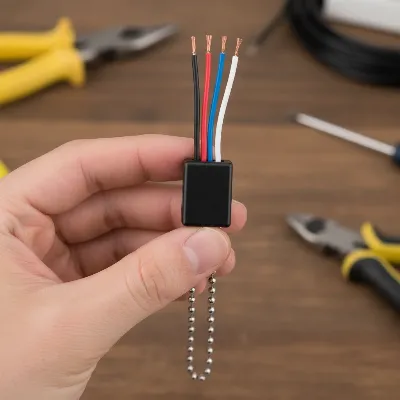 A hand holding a ceiling fan pull chain switch with several colored wires, highlighting the switch’s body and wire connections for identification.
Essential Tools and Materials for Replacement
Before you begin, gathering the right tools and materials will ensure a smooth and safe replacement process. Having everything readily available eliminates interruptions and streamlines the repair.
Tools You’ll Need:
- Step Ladder or Sturdy Stool: To safely reach the ceiling fan.
- Phillips and Flathead Screwdrivers: For removing fan housing and light kit screws.
- Needle-Nose Pliers: Useful for disconnecting wires, bending small components, and maneuvering in tight spaces.
- Wire Strippers: If the old wires need to be trimmed or new wires attached to the switch.
- Voltage Tester (Non-Contact Preferred): Absolutely critical for confirming the power is off before touching any wires.
- Flashlight or Headlamp: For better visibility in the often dimly lit work area.
Materials You’ll Need:
- Replacement Pull Chain Switch: Ensure it matches your fan’s specifications (number of wires, speeds, voltage/amperage).
- Replacement Beaded Chain and Connector: If only the external chain broke, and not the internal switch.
- Wire Nuts: To securely connect electrical wires.
- Electrical Tape (Optional but Recommended): For added insulation and securing wire nut connections.
- Smartphone Camera: To take reference photos of the wiring before disconnection.
Having these items on hand will equip you for any scenario, whether you’re simply replacing a broken chain or undertaking a full switch replacement.
Step-by-Step Guide to Replacing Your Ceiling Fan Pull Chain Switch
Replacing a ceiling fan pull chain switch involves several key steps, each requiring careful attention to detail and, most importantly, safety.
Safety First: Disconnecting Power
|
Our Picks for the Best Ceiling Fan in 2026
As an Amazon Associate I earn from qualifying purchases.
|
||
| Num | Product | Action |
|---|---|---|
| 1 | 41 inch Ceiling Fans with Lights, Black Flush Mount Ceiling Fan with Remote, 3CCT, LED Dimmable, Reversible, 6 Fan Speeds, Quite Low Profile Ceiling Fan with Lights Modern Bedroom Kitchen Indoor |

|
| 2 | Ceiling Fans with Lights, 42 Inch Ceiling Fan with Light And Remote, 3CCT Flush Moun Low Profile Ceiling Fans, 6 Speed Noiseless LED Ceiling Fan, Black Ceilings Fan with Remote for Bedroom Living Room |
|
| 3 | Ceiling Fan with Light, 40" Black Flush Mount Ceiling Fans with Remote Control,3CCT Dimmable LED, ABS 5-Fan Blades,Reversible Motor,Quiet Low Profile Indoor fandeliers for Bedroom Living Room |
|
| 4 | Passky Ceiling Fans with Lights, 52 inch Flush Mount Ceiling fan with Remote Control, Low Profile Ceiling Fan for Bedroom, Farmhouse, Reversible, 3CCT, Dimmable, Noiseless DC Motor, Black |
|
| 5 | ZMISHIBO 52 Inch Ceiling Fan with Light, App&Remote Control, Flush Mount Low Profile, Dimmable 20W LED Light, Quiet Reversible Motor for Bedroom, Living Room, Apartment, Black |
|
| 6 | Amico Ceiling Fans with Lights, 42 inch Low Profile Ceiling fan with Light and Remote Control, Flush Mount, Reversible, 3CCT, Dimmable, Noiseless, Black Ceiling Fan for Bedroom, Indoor/Outdoor Use |
|
| 7 | OJX Ceiling Fans with Lights, 52 inch Ceiling fan with Light and Remote/APP Control, 3CCT, Quiet DC Reversible, Dimmable, Modern Ceiling Fan for Bedroom, Living Room, Kitchen, Indoor/Outdoor Use |
|
| 8 | 41" Black Low Profile Ceiling Fans with Lights and Remote, Modern Flush Mount Ceiling Fan Light with Quiet Reversible DC Motor for Bedroom Kitchen |
|
| 9 | Passky Ceiling Fans with Lights, 52 inch Sleek Ceiling Fan with Light and Remote Control, 3CCT, Dimmable, Reversible, Noiseless, Black Ceiling Fan for Bedroom, Living Room |
|
| 10 | ZMISHIBO Ceiling Fans with Lights and Remote, 19.7'' Low Profile Ceiling Fan, 3000-6000K Dimmable Modern Flush Mount LED Fan Light, 6 Wind Speeds, Black Fandelier Ceiling Fans for Bedroom |
|
Before you touch any part of your ceiling fan, turn off the power completely at the circuit breaker. Do not rely solely on the wall switch. Locate your home’s main electrical panel, typically in a basement, garage, or utility closet. Find the breaker labeled for the room where the fan is located and switch it to the “off” position. If not clearly labeled, you may need to turn off the main breaker to the entire house for absolute safety. Use your voltage tester to confirm that no power is flowing to the fan by touching the tester to the fan’s wires once the housing is open. This step is non-negotiable to prevent electrical shock.
Accessing the Switch
Once the power is confirmed off, position your ladder securely beneath the fan. Begin by carefully removing any light bulbs, shades, or globes. Then, locate the screws or clips that secure the fan’s light kit or bottom housing. These typically require a Phillips or flathead screwdriver. Support the light kit or housing as you remove the last screw to prevent it from falling and damaging the wires. Gently lower it, allowing it to hang by its wires or resting it on the ladder if possible, to expose the internal wiring and the pull chain switch.
Disconnecting the Old Switch
Before disconnecting anything, take clear photos of how the wires are connected to the old switch. This visual reference is invaluable during reassembly. You’ll typically see several wires (often black, red, blue, white) connected to different terminals on the switch, usually secured by wire nuts or push-in terminals. Carefully unscrew the nut that holds the pull chain switch in place on the fan’s housing. Gently pull the switch down to gain better access to the wiring. Then, one by one, twist off the wire nuts or release the wires from their terminals, separating the old switch from the fan’s electrical system. Note which colored wire connects to which terminal or wire bundle.
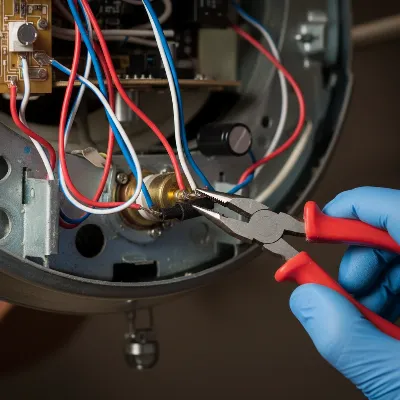 A close-up view of a ceiling fan’s internal wiring, with a hand carefully disconnecting wires from a pull chain switch.
Installing the New Switch and Wiring
With the old switch removed, it’s time to install the new one. If the new switch came with pre-stripped wires, you’re ready to go. If not, carefully strip about ½ inch of insulation from the end of each wire coming from the fan and from the new switch. Referring to your reference photos, connect the corresponding wires from the fan to the new switch. Twist the bare ends of the wires together clockwise and then secure them firmly with new wire nuts. Gently tug on each connection to ensure it’s secure. For an extra layer of safety and insulation, you can wrap each wire nut connection with electrical tape. Feed the new pull chain through the hole in the fan housing, then insert the body of the new switch and tighten the securing nut by hand, being careful not to overtighten.
Reassembly and Testing
Once all wires are securely connected and the new switch is in place, carefully tuck the wiring back into the fan housing, ensuring no wires are pinched. Reattach the light kit or bottom housing with its screws or clips. Screw in the light bulbs and replace any shades or globes. Double-check that all components are firmly attached.
Finally, return to your circuit breaker panel and turn the power back on to the room. Test the fan and light by pulling the new chain. The fan should cycle through its speeds, and the light should turn on and off as expected. If everything works correctly, congratulations – you’ve successfully replaced your ceiling fan’s pull chain switch!
Where to Purchase a Replacement Pull Chain Switch
Finding the right replacement pull chain switch is typically straightforward. Most general hardware stores, home improvement centers, and large electrical supply stores carry a variety of common pull chain switches. Brands like Zing Ear, Gardner Bender, and Westinghouse are widely available.
For a broader selection or specific models, online retailers such as Amazon, eBay, and specialty fan parts websites like CeilingFanSwitch.com are excellent resources. When purchasing online, always double-check the product description against your fan’s requirements (number of wires, speeds, electrical ratings) to ensure compatibility. If you’re unsure, taking your old switch to a local hardware store can allow an associate to help you find an exact match.
Conclusion
A broken ceiling fan pull chain doesn’t have to be a major setback or an excuse for a costly replacement. By understanding the simple mechanics, identifying the right parts, and following a methodical, safety-conscious approach, you can easily restore your fan’s functionality. This DIY repair not only saves money but also provides a sense of accomplishment, ensuring your space remains comfortable and well-lit. With the proper tools and a little patience, you can extend the life of your ceiling fan, bringing back that refreshing breeze and convenient lighting control. What other small home repairs are you ready to tackle with confidence?
Frequently Asked Questions
What should I do if the pull chain breaks off completely inside the switch?
If the chain breaks off inside, you will almost certainly need to replace the entire pull chain switch. You cannot easily reattach a new chain to the internal mechanism without disassembling the switch, which is not usually designed for repair.
How do I know if I need a two-wire or four-wire switch?
A two-wire switch is typically for a simple on/off function, often used for lights. A four-wire switch usually controls three fan speeds (low, medium, high, and off) for the fan motor itself. Count the wires on your old switch to determine the correct replacement type.
Can I replace a pull chain switch with a remote control?
Yes, it is often possible to upgrade your ceiling fan to remote control functionality. This usually involves installing a receiver unit inside the fan’s canopy that bypasses the pull chain switch. However, this is a more complex installation than simply replacing a pull chain switch and may require additional wiring or electrical knowledge.
Is it safe to use universal replacement switches?
Universal replacement switches can work, but it is crucial to ensure they match the electrical specifications (voltage, amperage) and wiring configuration of your original switch. Using an incompatible switch can lead to malfunctions or create electrical hazards. Always double-check compatibility before purchasing.
Frequently Asked Questions
What should I do if the pull chain breaks off completely inside the switch?
If the pull chain breaks off inside the switch mechanism, you will almost certainly need to replace the entire pull chain switch. The internal components are not typically designed for repair, making reattaching a new chain impractical without full switch disassembly.
How do I determine if I need a two-wire or four-wire switch?
To determine the correct switch type, count the wires on your old switch. A two-wire switch typically handles simple on/off light functions, while a four-wire switch usually controls three fan speeds (low, medium, high, and off) for the fan motor.
Is it possible to upgrade a ceiling fan with a pull chain to remote control?
Yes, it is often possible to upgrade a ceiling fan to remote control functionality. This typically involves installing a receiver unit inside the fan's canopy that bypasses the existing pull chain switch, though it is a more complex installation.
Are universal replacement pull chain switches safe to use?
Universal replacement switches can be safe if they precisely match the electrical specifications (voltage, amperage) and wiring configuration of your original switch. Always verify compatibility to prevent malfunctions or potential electrical hazards.
What tools are essential for replacing a ceiling fan pull chain switch?
Essential tools for replacing a ceiling fan pull chain switch include a step ladder, Phillips and flathead screwdrivers, needle-nose pliers, wire strippers, and a non-contact voltage tester. A flashlight and smartphone camera are also highly recommended for safety and reference.
Replace a Ceiling Fan Pull Chain Switch
Learn how to safely replace a broken ceiling fan pull chain switch to restore fan and light functionality.
Before starting any work, turn off the power to the ceiling fan at your home's circuit breaker. Use a voltage tester to confirm that no power is flowing to the fan's wires, ensuring complete safety from electrical shock.
Securely position a ladder and remove any light bulbs, shades, or globes. Then, unfasten the screws or clips securing the fan's light kit or bottom housing to expose the internal wiring and the pull chain switch.
Take clear photos of the wiring connections to the old switch for reference. Carefully unscrew the nut holding the switch in place, then twist off wire nuts or release wires from terminals to detach the old switch from the fan's electrical system.
Strip about u00bd inch of insulation from wires if necessary. Referring to your photos, connect the corresponding wires from the fan to the new switch using new wire nuts, twisting clockwise. Secure connections firmly and wrap with electrical tape for added insulation. Feed the new pull chain through the housing and tighten the switch's securing nut.
Tuck wiring back into the housing, ensuring no wires are pinched. Reattach the light kit or bottom housing, screw in light bulbs, and replace shades. Finally, restore power at the circuit breaker and test the fan and light by pulling the new chain to confirm proper operation.

The instructions were mostly good for replacing the pull chain mechanism. I found that disconnecting the power was a bit more involved than I expected, as my breaker box isn’t labeled very well. The part about carefully replacing the old switch was helpful, but I wish there was a bit more detail on how to choose the right compatible switch, as there are so many options out there.
I was so frustrated with my ceiling fan’s light not turning on, and I thought I’d have to buy a whole new fan. This guide was a lifesaver! The steps for accessing the internal switch were super clear, and I was able to replace the old switch with a new one in about 45 minutes. My fan light works perfectly now, and I saved a ton of money.
My fan’s speed control chain broke, and it was stuck on high all the time, which was annoying. This DIY task seemed daunting at first, but the explanation of how the pull chain connects to the internal switch made me feel more confident. It really is a straightforward repair, and I appreciate not having to replace the entire ceiling fan unit. Great advice!
I’ve done a few minor home repairs, but never tackled a ceiling fan. When my fan’s light chain snapped, I figured it was time. The guide’s emphasis on understanding the fan’s pull chain mechanism was key for me. It really helped me visualize what I was doing inside the fan body. Everything works great now, and it was much easier than I thought it would be.