A clicking ceiling fan often indicates a loose component, misalignment, or friction within the unit, which can typically be resolved with five common DIY fixes. These include tightening loose screws, balancing the fan blades, lubricating moving parts, inspecting for obstructions, and securing light fixtures or decorative covers. Addressing these issues promptly can restore quiet operation and prevent potential damage to the fan’s motor or electrical components.
Decoding the Click: Common Reasons Your Ceiling Fan Makes Noise
A ceiling fan’s clicking sound typically indicates that a component is loose, misaligned, or experiencing friction. Unlike a persistent hum or a grinding noise, clicking often follows the rhythm of the fan’s rotation, occurring once per revolution or at regular intervals. These sounds are most frequently caused by the vibrations inherent in a spinning fan, which can gradually loosen parts over time. Identifying the precise source of the click is crucial for an effective fix.
Five Quick Fixes to Silence Your Clicking Ceiling Fan
Most clicking issues can be resolved with basic tools and a bit of patience. Always ensure the power to your ceiling fan is turned off at the circuit breaker before attempting any repairs. For see our ceiling fans recommendations on this site.
Tighten Loose Screws and Hardware
Loose hardware is the most frequent cause of a clicking ceiling fan. Over time, the constant vibration from the fan’s operation can cause screws to loosen, leading to components shifting and making contact. Start by systematically checking and tightening all visible screws.
- Blade Mounting Screws: Inspect the screws that attach the fan blades to the blade brackets and the brackets to the motor housing. Use a screwdriver to gently tighten any that feel loose, but avoid overtightening, which can strip the screws or damage the components.
- Motor Housing Screws: Some fans have external screws on the motor housing. Check these to ensure they are snug.
- Canopy and Mounting Bracket Screws: The decorative canopy covering the wiring connection at the ceiling, as well as the mounting bracket securing the fan to the ceiling, can also have loose screws. Tighten these carefully.
Balance the Fan Blades
An unbalanced set of fan blades can cause wobbling and vibrations, leading to clicking noises, especially at higher speeds. This imbalance can strain the motor and other parts, potentially shortening the fan’s lifespan.
- Visual Inspection: Stand back and observe the fan while it runs on a medium setting. Look for any noticeable wobbling of the blades or the entire fan assembly.
- Blade Alignment: Turn off the power. Use a ruler or tape measure to check if all blades are at the same distance from the ceiling. Gently bend a blade up or down if it’s out of alignment.
- Balancing Kit: If visual inspection doesn’t reveal an obvious issue, a fan blade balancing kit can help. These kits typically include small weights and clips. Follow the kit’s instructions to identify the unbalanced blade and apply weights to restore equilibrium.
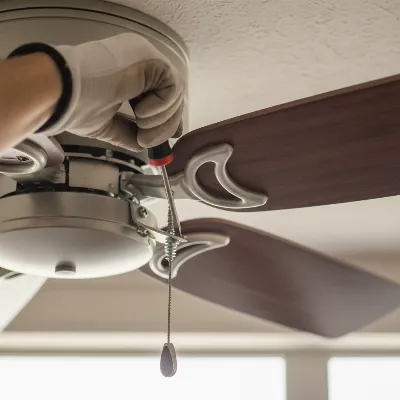 A close-up of a person's hand tightening a screw on a ceiling fan blade bracket with a screwdriver, emphasizing DIY repair.
Lubricate Moving Parts
|
Our Picks for the Best Ceiling Fan in 2026
As an Amazon Associate I earn from qualifying purchases.
|
||
| Num | Product | Action |
|---|---|---|
| 1 | OJX Ceiling Fans with Lights, 52 inch Ceiling fan with Light and Remote/APP Control, 3CCT, Quiet DC Reversible, Dimmable, Modern Ceiling Fan for Bedroom, Living Room, Kitchen, Indoor/Outdoor Use |

|
| 2 | 41 inch Ceiling Fans with Lights, Black Flush Mount Ceiling Fan with Remote, 3CCT, LED Dimmable, Reversible, 6 Fan Speeds, Quite Low Profile Ceiling Fan with Lights Modern Bedroom Kitchen Indoor |
|
| 3 | Ceiling Fan with Light, 40" Black Flush Mount Ceiling Fans with Remote Control,3CCT Dimmable LED, ABS 5-Fan Blades,Reversible Motor,Quiet Low Profile Indoor fandeliers for Bedroom Living Room |
|
| 4 | Passky Ceiling Fans with Lights, 52 inch Flush Mount Ceiling fan with Remote Control, Low Profile Ceiling Fan for Bedroom, Farmhouse, Reversible, 3CCT, Dimmable, Noiseless DC Motor, Black |
|
| 5 | Passky Ceiling Fans with Lights, 52 inch Sleek Ceiling Fan with Light and Remote Control, 3CCT, Dimmable, Reversible, Noiseless, Black Ceiling Fan for Bedroom, Living Room |
|
| 6 | ZMISHIBO Ceiling Fans with Lights and Remote, 19.7'' Low Profile Ceiling Fan, 3000-6000K Dimmable Modern Flush Mount LED Fan Light, 6 Wind Speeds, Black Fandelier Ceiling Fans for Bedroom |
|
| 7 | Ceiling Fans with Lights, 42 Inch Ceiling Fan with Light And Remote, 3CCT Flush Moun Low Profile Ceiling Fans, 6 Speed Noiseless LED Ceiling Fan, Black Ceilings Fan with Remote for Bedroom Living Room |
|
| 8 | 41" Black Low Profile Ceiling Fans with Lights and Remote, Modern Flush Mount Ceiling Fan Light with Quiet Reversible DC Motor for Bedroom Kitchen |
|
| 9 | ZMISHIBO 52 Inch Ceiling Fan with Light, App&Remote Control, Flush Mount Low Profile, Dimmable 20W LED Light, Quiet Reversible Motor for Bedroom, Living Room, Apartment, Black |
|
| 10 | Amico Ceiling Fans with Lights, 42 inch Low Profile Ceiling fan with Light and Remote Control, Flush Mount, Reversible, 3CCT, Dimmable, Noiseless, Black Ceiling Fan for Bedroom, Indoor/Outdoor Use |
|
Older ceiling fans, or those that haven’t been used in a while, might develop a clicking sound due to dry or worn motor bearings. Lubrication can sometimes resolve this issue by reducing friction.
- Identify Lubrication Port: Many fans have a small oil hole near the top of the motor housing. Consult your fan’s manual to confirm if it’s a self-lubricating model or if it requires oil.
- Apply Oil: If your fan requires lubrication, apply a few drops of non-detergent 10W or 20W oil into the oil hole. Avoid using WD-40 or other multi-purpose lubricants, as these can damage the motor.
- Test: Turn the power back on and run the fan to see if the clicking subsides. If the bearings are severely worn, lubrication might only offer a temporary fix, or no fix at all, potentially indicating a need for professional service or replacement.
Inspect for Obstructions
Sometimes, a clicking noise is simply caused by something momentarily interfering with the fan’s rotation. This is often the easiest problem to diagnose and fix.
- Pull Chains: Ensure that any pull chains (for fan speed or light operation) are not hitting the blades or the motor housing as the fan spins. If they are, you can often shorten them or secure them with a small tie.
- Loose Wiring: Inside the fan’s canopy, loose wires could be tapping against the mounting bracket. After turning off the power, gently tuck any loose wiring back into the canopy, ensuring it won’t interfere with moving parts.
- Decorative Elements: Check if any decorative covers, light fixture components, or even nearby curtains are coming into contact with the blades.
Secure Light Fixtures and Decorative Covers
If your ceiling fan includes an integrated light kit or has multiple decorative elements, these can also be a source of clicking. Loose components here can rattle or shift, creating noise.
- Light Kit Screws: Inspect all screws holding the light kit to the fan’s main body. Tighten them carefully.
- Bulbs and Globes: Ensure all light bulbs are screwed in tightly and that any glass globes or covers are securely fastened. Loose glass can rattle with the fan’s vibration.
- Other Decorative Parts: Some fans have finials, caps, or other ornamental pieces. Check that these are all secure and not vibrating against other parts.
When to Call a Professional for Persistent Clicking
While many clicking sounds can be remedied with the simple fixes above, some issues are more complex and require expert attention. If you’ve tried all the DIY solutions and your fan continues to click, or if you suspect an electrical problem, it’s time to call a qualified electrician.
Internal motor issues, worn-out motor bearings that cannot be lubricated, or faulty electrical connections within the fan’s wiring are typically beyond the scope of a homeowner’s repair. A professional can safely diagnose and address these deeper problems, potentially saving you from needing a full fan replacement. Ignoring a persistent clicking, especially if it’s accompanied by grinding, humming, or an electrical burning smell, can be dangerous and could lead to motor failure or electrical hazards.
“A persistent clicking sound in a ceiling fan can be more than just an annoyance; it’s often a signal that something needs attention. While many fixes are simple, knowing when to call an electrician can prevent further damage and ensure your home’s safety.” – John Davis, Certified Electrician
Proactive Steps: Keeping Your Ceiling Fan Quiet
Regular maintenance can significantly extend the life of your ceiling fan and prevent irritating noises. A few simple habits can keep your fan operating smoothly and silently.
- Routine Cleaning: Dust accumulation on fan blades can throw them off balance and also get into the motor, affecting its performance. Regularly wipe down the blades and motor housing.
- Annual Tightening Check: Make it a habit to check and tighten all fan screws annually. This simple step can prevent most clicking issues before they even start.
- Blade Inspection: Periodically inspect blades for signs of warping, bending, or damage, especially if your fan is exposed to humidity or extreme temperatures. Replace damaged blades as needed.
- Proper Installation: If you’re installing a new fan, ensure it is mounted correctly and securely according to the manufacturer’s instructions. Incorrect installation is a common cause of wobbling and noise.
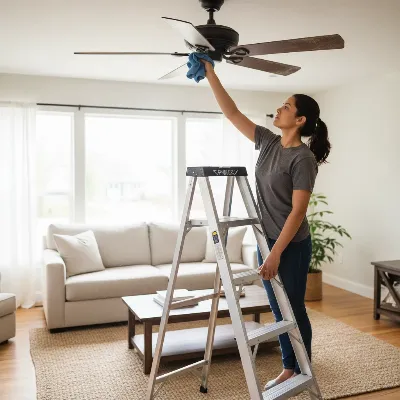 A person standing on a step ladder cleaning dust off a ceiling fan blade with a microfiber cloth, depicting maintenance.
Conclusion
A clicking ceiling fan doesn’t have to be a permanent fixture in your home. By systematically addressing common issues like loose screws, unbalanced blades, or minor obstructions, you can often restore your fan to quiet operation with a few simple DIY steps. Regular maintenance and a keen ear for unusual sounds can help you catch problems early. If your efforts don’t resolve the issue, remember that a qualified professional is always available to ensure your fan is operating safely and silently. What quiet comfort will you enjoy once your ceiling fan is spinning silently once more?
Frequently Asked Questions
Is a clicking ceiling fan dangerous?
Not always, but a clicking fan can indicate underlying issues that may become dangerous if ignored. While often a sign of loose components, it can also point to worn bearings or electrical problems. Left unaddressed, these could damage the motor or wiring, potentially posing a safety risk. It is best to investigate and resolve the source of the noise.
How often should I perform maintenance on my ceiling fan?
It is recommended to perform a basic check and cleaning of your ceiling fan at least once or twice a year, especially before seasons of heavy use. This includes wiping down blades, checking for loose screws, and ensuring proper balance. For more in-depth checks, an annual service by a professional electrician can help prevent major issues and extend the fan’s lifespan.
Frequently Asked Questions
Why does my ceiling fan make a clicking noise?
A ceiling fan typically makes a clicking noise due to loose components, misaligned parts, or friction. Common culprits include loose screws on blades or the motor housing, unbalanced blades, dry motor bearings, or obstructions like pull chains hitting the blades.
Can I fix a clicking ceiling fan myself?
Yes, many clicking ceiling fan issues can be resolved with basic DIY fixes. You can tighten loose screws, balance the fan blades using a kit, lubricate the motor with 10W or 20W non-detergent oil, and inspect for obstructions like loose wiring or decorative elements. Always turn off power at the circuit breaker first.
When should I call a professional for a noisy ceiling fan?
You should call a qualified electrician if your ceiling fan continues to click after trying all DIY fixes, or if you suspect an electrical problem. Persistent clicking accompanied by grinding, humming, or an electrical burning smell indicates more serious internal motor issues or faulty wiring that require professional attention.
What type of oil should I use to lubricate my ceiling fan?
If your ceiling fan requires lubrication, use a few drops of non-detergent 10W or 20W oil. Consult your fan's manual to confirm if it's a self-lubricating model or if it has an oil port. Avoid using WD-40 or other multi-purpose lubricants, as these can damage the motor bearings.
How can I prevent my ceiling fan from making noise in the future?
Preventative maintenance can keep your ceiling fan quiet. Regularly wipe down blades to prevent dust accumulation, check and tighten all screws annually, and periodically inspect blades for warping or damage. Proper installation is also crucial for new fans to avoid wobbling and noise.
Silence a Clicking Ceiling Fan
Follow these steps to diagnose and fix common causes of clicking noises in your ceiling fan, restoring quiet operation.
Turn off power at the circuit breaker. Systematically check and tighten all screws on the blade mounts, motor housing, canopy, and mounting bracket. Avoid overtightening to prevent stripping.
Visually inspect for wobbling while the fan runs on medium. If unbalanced, turn off power and use a ruler to check blade alignment. For persistent wobble, use a fan blade balancing kit with weights to restore equilibrium.
Consult your fan's manual for lubrication requirements. If needed, apply a few drops of non-detergent 10W or 20W oil into the motor's oil port. Do not use WD-40.
Turn off power and check for anything interfering with the fan's rotation. Ensure pull chains are not hitting blades, tuck any loose wires into the canopy, and secure decorative elements or light fixture components.
Tighten all screws holding the light kit to the fan body. Ensure light bulbs are screwed in tightly and any glass globes or covers are securely fastened to prevent rattling from vibrations.

The advice on lubricating moving parts was a game-changer for my old fan. I thought I’d have to replace the whole thing because of the constant clicking, but a little bit of oil in the right spots made it silent again. It’s running smoother than it has in years. Definitely saved me some money!
I tried balancing the fan blades like suggested, and it helped a little with the clicking, but it’s not completely gone. I think my fan might be an older model, so maybe it’s just worn out. Still, it’s less noticeable now, so I appreciate the advice on that specific fix.
My ceiling fan started making this annoying clicking sound out of nowhere, and it was driving me crazy. I followed the tip about tightening all the screws, especially on the light fixture, and it totally worked! So glad I didn’t have to call an electrician. It’s back to being super quiet now, which is great for sleeping.
We had a persistent clicking sound that was really bothering us, especially in the evenings. I checked for obstructions around the blades and found a tiny piece of plastic that must have fallen in there. Removing it instantly stopped the noise! It’s amazing how a small thing can cause such a big problem. Thanks for the clear steps.